Projects
Run a project from lead to complete, from the register through the record's tabs to the archive.
Find a project
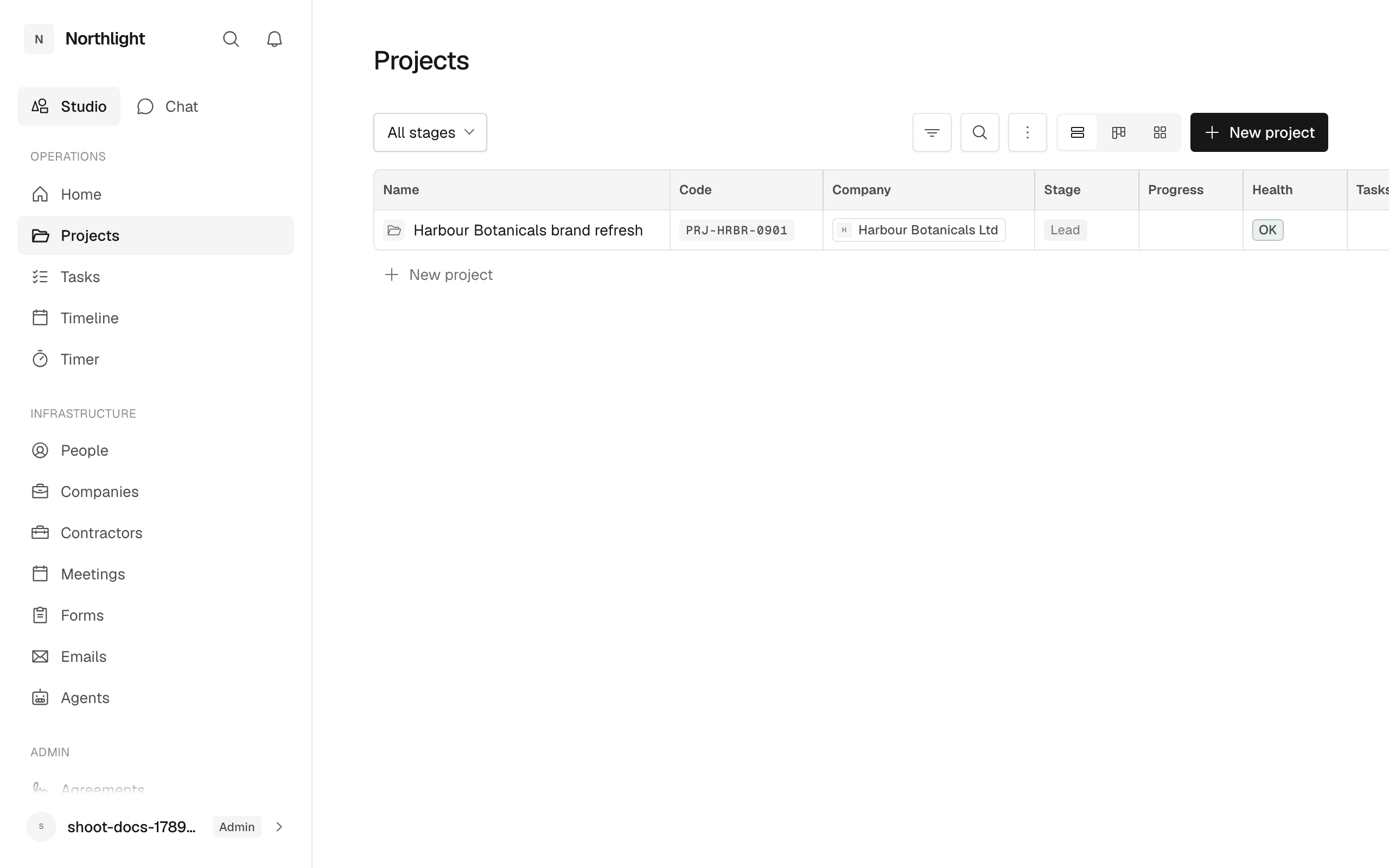
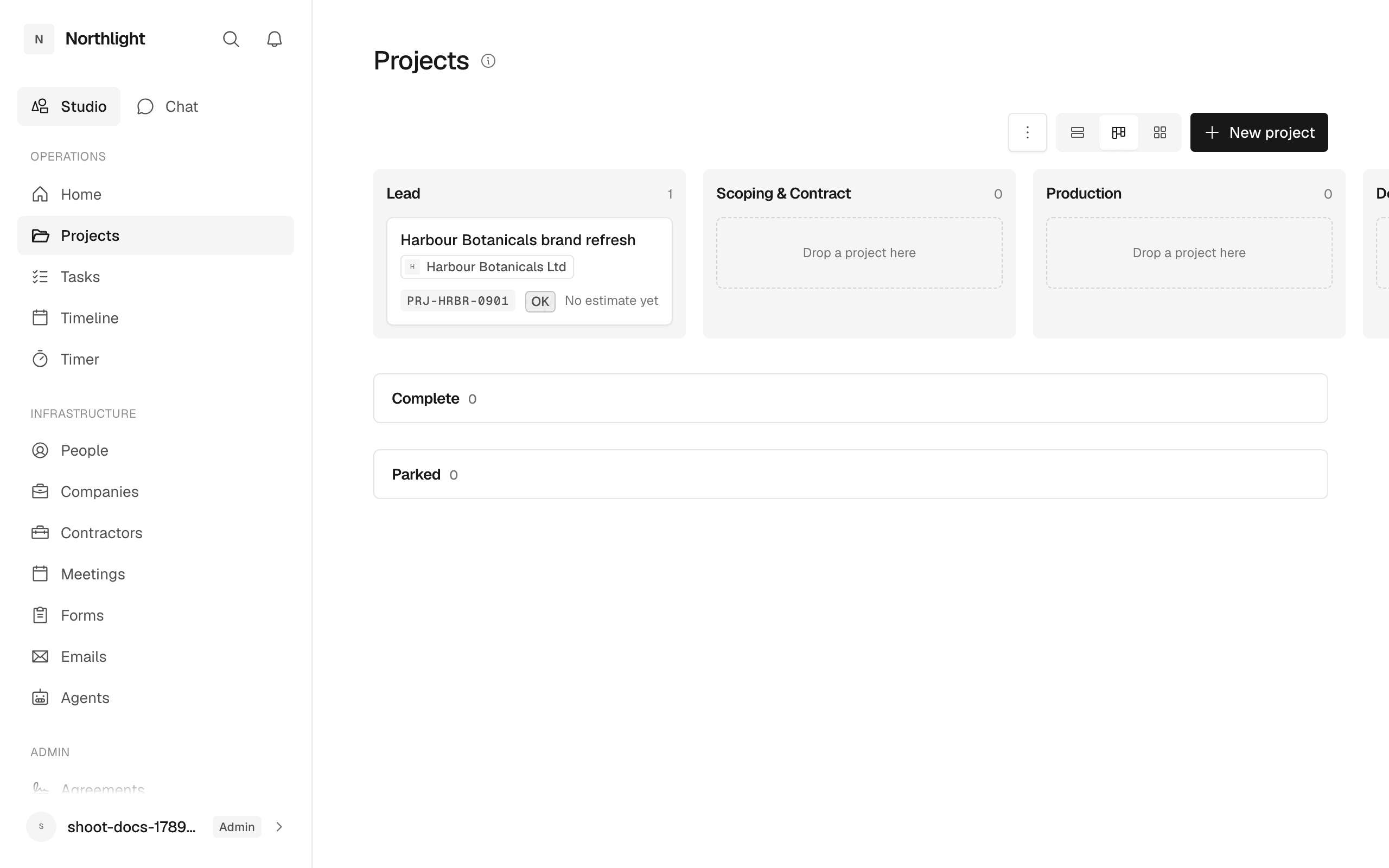
The register is at /admin/projects. It lists every project, grouped by stage, in three views; switch with the view switcher beside the search box.
- Table: one row per project, with Name, Code, Company, Stage, Progress, Health, Tasks, Files and Created. Name, Company and Stage edit in place.
- Board: one column per open stage. Drag a card to move it. Parked and Complete sit in collapsed bands under the board and take a drop too.
- Cards: the card a client sees on their own /projects, with the company chip and health tag added.
The stage filter leads the table toolbar. Right-click a row for Open project, Open company, Copy link, Pin and Archive.
Create a project
Press New project on the toolbar. The dialog asks for Company, Project name and Stage. Leave the company on the studio's own option for internal work. The foot row also creates one. The code is allocated on creation and never changes, and every new project gets the studio's default reviews.
Move a project along
The stages are Lead, Scoping, Production, Delivery, Ongoing, Complete and Parked. Clients only see projects past scoping.
Change the stage from the Stage cell in the table, by dragging on the board, or from the Stage row on the Overview tab. Moving to Parked asks for a reason, which is written to the History.
Some moves happen on their own: drafting a proposal moves a lead to Scoping, a signed proposal or the first deliverable started moves it to Production, and the last deliverable delivered moves it to Delivery.
Read the record
An admin sets the band colour from Cover, which appears over the band, and the mark from the picker beside the name: an emoji, one of the app's icons, or an uploaded picture.
Under the name, after the team, a client project reads Client last here and when, or Client not in the portal yet. It counts the client opening this project's deliverables, invoices and review rounds, and never says who.
The tabs are:
- Overview: Company and Primary contact, Stage, the next deadline (or Overdue), a Signed paper count, the Studio team, then the description. With client is what the client reads; Studio holds notes they never see.
- Deliverables: a grid of Deliverable, Start, Due, Status, Rounds, Client opened, Tasks and Files, as a List or a Timeline. Press the status pill to move it between Not started, In progress, Delivered, Changes requested and Approved. A client sees Approve and Request changes on a Delivered deliverable only, and Request changes needs a reason. Open a deliverable for its Description, files, the Client sees switch and its Chat.
- Tasks: a register of Task, Status, Owner, Due, Priority, Deliverable, Notes and Time. New task asks for Title, Notes, Due date and Assign to. Statuses are Not started, In progress, In review, Blocked, Done and Cancelled; priority is low, normal or high.
- Reviews (admin only): dated moments the client sees, with Review, Shared note, Target, On the table, Held and Send. Holding a review delivers everything on its table for approval.
- Stages: the blocks of work, the rounds inside them, and the meetings each stage plans. An open round shows when it was asked and, for the studio, how often the client opened it: Never opened, or the visits and when, from the Stages tab or the feedback link. A planned meeting is a calendar chip on its stage reading Kick-off · not booked, the booked day, or held and the day; see Plan the meetings.
- Documents: the project's paperwork, in four sections. Proposals lists every proposal, drafts included, with Reference, Status, Total, Sent and Signed; New proposal at the foot starts a draft for this project. Invoices lists Number, Status, Total and Due; New invoice at the foot opens the invoice dialog with the project chosen. Signed documents holds paper signed outside the portal (see Agreements). Files lists every file, with File, Deliverable, Uploaded by, Uploaded and Size; Upload file takes up to 25MB, and right-click offers Preview, Download, Rename and Delete file. A client sees their sent and accepted proposals, their issued invoices, signed documents and files, never a draft.
- People: everyone on the project, with Type, Role on project and Client sees. Nobody from the studio reaches the client until Client sees is on.
- Finance (admin only): Invoices, Ledger, Expenses, Commercials and, on a retainer project, Retainer.
- Meetings (admin only): Booking links to send, and Meetings held.
- History: everything that happened, newest first, from creation and stage moves to comments, uploads, invoices and expenses.
- Chat: Studio is never seen by the client; With client is read by everyone on the project. A client gets the shared lane alone.
Plan the meetings
A stage can say which meetings it needs: a kick-off at its start, a presentation with a review round, a handover at delivery. In the service library, each stage of a service lists its Meetings under its band, picked from the studio's meeting types with when each is held (At the start, With round N, At delivery); the service card counts them beside the tasks it seeds. Adding the service to a project copies them onto the project's stages as planned meetings, dated from the stage the way a deliverable is. + Meeting on a stage plans one by hand.
On the Stages tab a planned meeting is a calendar chip where its moment falls: above the deliverables for a start meeting, on its round's line, or at the foot of the stage for delivery. Press it for Offer times (a draft booking link made from the plan's meeting type, filed under the project; add windows and publish it on the link's record), Log it (files the meeting as held and opens its record for the notes) or Remove, offered while nothing has happened. When somebody books through the link the chip turns to the booked day on its own; the home page lists Meetings to book for any plan on a live stage still without a link.
A client sees the same chips on their own project and no controls.
Record the money
On the Finance tab, Expenses takes What was it, Amount, Currency, Date incurred and a Rebill to the client tick. Commercials holds the Project code, Currency, Agreed fee and Estimated value. Accepting a proposal overwrites the fee and currency.
Retainer appears at Ongoing or once a retainer exists. Start a retainer asks for Amount per period, Currency, Cycle (Monthly or Quarterly), Included hours and Starts on. Each period offers Raise invoice, warns when it ended unbilled, and shows hours beyond the allowance. End this retainer sets an end date; once every period has closed, Mark it Complete is offered.
See work in time
/timeline draws every dated thing by project. An admin chooses All studio, My work or People. The View menu switches the Tasks, Deliverables, Bookings, Reviews and Retainers layers. Drag an item to move its date; retainer periods never move.
Archive a project
Right-click a row and choose Archive. Everything under the project is kept; it leaves the lists, the board, search and health. The ⋮ menu on the toolbar opens Archived projects, and Live projects leads back. An archived record shows a notice with Unarchive. Delete is refused for a project with logged time, expenses, issued invoices, sent proposals or bookings; archive those instead.
In the app
- /admin/projects, with
?view=board,?view=cardsand?archived=1 - /projects for a client's own list
/projects/[id]and its tabs, such as?tab=deliverables,?tab=documentsand?tab=money/deliverables/[id]and/tasks/[id]- /my for every task
- /timeline